 Ozil AI
The short answer. You can make the Ozil AI goal video three ways. The free one is the CapCut template, which runs in the CapCut app on your phone and opens from a TikTok link. The one with the most control is a general video model such as Dreamina, Kling or Seedance, where you upload a photo and write the whole goal out as a prompt. The one with the least work is a site built for this goal: on Ozil AI you upload one photo and about 6 minutes later you download a 15-second vertical MP4, paid once from $4.99 for 1 video, with no app and no prompt. Use the template if you are on your phone and free matters most; use a site like ours if you want the whole goal from one photo without writing anything.
Updated October 16, 2026.
What the video is
The trend recreates Mesut Özil's late winner for Arsenal at Ludogorets in the Champions League on November 1, 2016: the chip over the keeper, the two slide tackles he slips past and the calm finish into an empty net. In the AI version the scorer is someone else, usually the least likely footballer you can think of, wearing whatever they wore in the photo. That contrast is the whole joke.
How-to videos for it were on TikTok by October 10, 2026, and Google searches for "ozil ai" jumped on October 15.
Way 1: the free CapCut template
Almost all of the remakes we watched were tagged #capcut. The tutorials we watched show the same flow:
- Find an Ozil AI video on TikTok made with the template and copy its link. Several tutorials end on a screen recording that starts with "First copy the video link".
- Open the CapCut app and paste the link to open the template.
- Add one photo and let it render.
- Export and post, adding the sound from the TikTok library.
It costs nothing. The limits: it lives in the CapCut app, you get what the template was built to do, and whether the result has sound depends on the template. Many of the clips people stitch together show each person for about five to six and a half seconds. We go through it in more detail in the Ozil AI CapCut template guide.
Way 2: a video model and your own prompt
One of the earliest tutorials we found, from October 10, carries a Dreamina watermark, and people searching the trend also look up Kling. These are general video models: they make any scene you describe, so you describe this one.
- Open an image-to-video tool (Dreamina, which runs Seedance 2.5 for this trend's page, or Kling's Image to Video).
- Upload one clear photo of the person who will score.
- Write the goal out: a night match under floodlights, the keeper rushing out, the chip, two slide tackles dodged, the finish into an empty net, one broadcast camera following the play, plain kits with no crests.
- Render, check, and change the prompt if the face, the ball or the camera went wrong. Expect more than one try.
This route gives you the most control, and it costs a subscription or credits on the model's site. Dreamina's paid plans start at SGD 20 a month and list "Remove the Dreamina watermark in downloads" as a paid feature.
Way 3: one photo in a browser
A site made for this one goal keeps the prompt on its side. On Ozil AI:
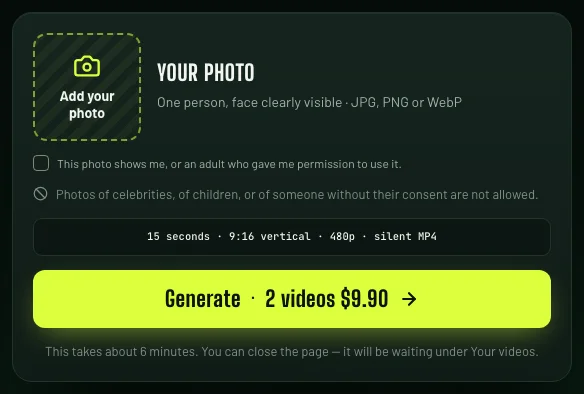
- Upload one photo with the face clearly visible. It has to be you, or an adult who agreed; you tick a box to confirm.
- Press Generate. A video uses 100 credits, from packs paid once: 1 video for $4.99, 2 for $9.90, 6 for $19.90, and 10 for $29.90. Credits do not expire.
- About 6 minutes later, download a 15-second 9:16 MP4 in 480p. You can close the tab meanwhile; the video waits in your account.
The whole goal is generated new with the person from the photo as the scorer. There is no match footage in it and the kits carry no club crests. If a video fails, its credits go back.
The example above was made from one photo of an AI-generated face, not a real person. Her dressing gown and slippers came straight from the photo.
Can you make it for free?
Yes, with the CapCut template. It is the only route we found that costs nothing.
General video models charge credits or a subscription, and Dreamina lists watermark-free downloads as a paid feature. Sites built for the goal are paid: some list a single video from $4.99, others sell packs. Rendering 15 seconds of video costs real money every time, so we have no free trial either. The tools compared lists what each one charges.
Which way to pick
- You are on your phone and want it free: the CapCut template.
- You want to change the scene, the kit or the angle: a video model with your own prompt.
- You want the whole goal from one photo without writing a prompt, on any device: a site built for it, such as Ozil AI.
Posting it
Our file is a silent 9:16 MP4, the shape TikTok, Reels and Shorts expect. Add the trend's sound from the TikTok or Instagram sound library when you post, and use the platform's AI label.
Use it responsibly
- Use your own photo, or the photo of an adult who said yes.
- No celebrities and no children, and nothing meant to pass as real match footage.
- The trend copies a real goal by a real player. No site that makes these videos, ours included, is connected to Mesut Özil, Arsenal, Ludogorets or UEFA.