 Ozil AI
The short answer. The Ozil AI CapCut template is free and runs in the CapCut app, not in TikTok: you copy the link of an Ozil AI video made with it, open CapCut and add one photo. It costs nothing and works from a phone. What it cannot give you is a set length or sound you can count on, or anything beyond what its maker built in, and every tutorial we watched does it in the phone app. If you are on a computer, or you want the whole 15-second goal from one photo, a generator such as Ozil AI does it in about 6 minutes, paid once from $4.99 for 1 video.
Updated October 17, 2026.
Where the template is
The tutorials we watched do not point to one official template page. They reach the template from a TikTok video, and almost all of the remakes we watched carry #capcut and #capcutpioneer, the tag of CapCut's own creator programme. The earliest how-to video with a CapCut tag we found was posted on October 11, 2026.
The way in, as the tutorials show it:
- Start on TikTok. Find an Ozil AI goal video that was made with a template. Several tutorials end with a phone screen recording that begins "First copy the video link".
- Copy the link of that video.
- Open the CapCut app and paste it to reach the template.
One green-screen tutorial spells it out on screen as "APP: CAPCUT" and ends in the CapCut editor. If a link opens nothing, try the link from a different video.
How to use it
- Open the template in CapCut.
- Add the photo it asks for. One person, face clearly visible, works best.
- Let it render and preview the result.
- Export, then post. Add the trend's sound from the TikTok library if the template has none.
It takes a few taps and costs nothing, which is what the tutorial captions lead with: "free" and "just upload your picture".
What the template can and can't do
In the 22 remakes we watched on October 16, 2026, almost all of them tagged #capcut, the clips swap in the whole person, clothes and all, and in most of them the stadium is generated new: keepers' kits and advertising boards differ from clip to clip. Most tutorials stitch two to four people together, each for about five to six and a half seconds.
The limits:
- Made in the phone app. Every tutorial we watched does it in the CapCut app; none showed a browser route.
- You get what the maker built. Length and sound depend on the template. We have not opened one ourselves, so we cannot tell you whether a given template includes sound.
- Links depend on finding the right video. You need a TikTok post that carries a working template.
When to use a generator instead
Use a one-photo generator when:
- You are on a computer. The tutorials all use the CapCut phone app; a generator works in the browser.
- You want the whole goal, start to finish. On Ozil AI one photo gives a 15-second, 9:16 MP4 in 480p, from the chip over the keeper to the empty net.
- You want to know what you get before you start. 100 credits a video, packs of 1 video for $4.99, 2 for $9.90, 6 for $19.90, and 10 for $29.90, paid once. Credits do not expire and a failed video gives its credits back.
The file is silent, so add the trend's sound when you post.
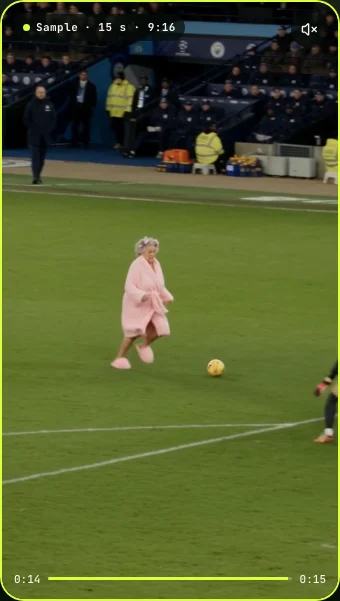
The frame above comes from our own sample, made from one photo of an AI-generated face.
Template or generator?
| You want… | Use |
|---|---|
| A free version on your phone, today | The CapCut template |
| Several friends stitched into one post | The template, or a few generator videos edited together |
| The whole 15-second goal from one photo | A generator such as Ozil AI |
| To make it on a computer | A generator |
| To change the kit, the angle or the stadium | A video model and your own prompt |
Either way
- Use your own photo or one of an adult who agreed. No celebrities, no children.
- Say it is AI when you post; TikTok has a label for it.
- This site is not connected to Mesut Özil, Arsenal or UEFA.