 Ozil AI
The short answer. A good Ozil AI prompt has five parts: who scores (taken from your photo, clothes included), where (a floodlit stadium at night), the play in order (the keeper rushing out, the chip, two slide tackles dodged, the finish into an empty net), the camera (one broadcast shot following the ball, no cuts) and what to keep out (club crests, logos, text, any real player's face). Upload the photo with an image-to-video model such as Seedance or Kling, and expect to adjust and render again. Do not use the match clip as a reference and do not name the player: in our tests that brought back Özil himself. If you would rather not write a prompt at all, Ozil AI makes the 15-second video from one photo.
Updated October 16, 2026.
Which models people use
The tutorials and searches around the trend point at a few general video models:
- Dreamina, CapCut's video site. Its Ozil goal page runs on Seedance 2.5 and offers three sample prompts, all for 16:9 clips with an original adult player and no club crests.
- Seedance 2.5 directly, through an API. Our own site ran on it until October 21, 2026; it now uses Seedance 2.0 mini with a reference clip.
- Kling AI, through its Image to Video tool. People searching "ozil ai" also look it up.
Whichever you use, pick the image-to-video mode, so the scorer comes from your photo, and set the format to 9:16 if you are posting to TikTok or Reels. Dreamina's samples are 16:9.
A starter structure
Fill in the brackets and keep the order. Plain sentences work better than a list of keywords.
Format: vertical 9:16 video, [length] seconds, realistic, one continuous shot.

Scorer: the person in the photo, with the same face, hair and clothes
as in the photo. [Describe them in a few words, e.g. "an older woman
in a pink dressing gown and slippers".]

Setting: a professional football match at night, floodlights,
full stands, stewards in yellow vests by the pitch.

The play: the scorer runs onto a through ball, the goalkeeper rushes out
and the scorer chips the ball over him, controls it as it lands,
slips past a sliding defender, then a second sliding defender,
and side-foots the ball into the empty net.

Camera: one broadcast camera, high and to the side, following the
ball the whole way. No cuts, no slow motion.

Keep out: club crests, sponsor logos, readable text, watermarks,
and the face of any real footballer. Plain kits.
This is a starting point, not the prompt our site uses. Models read prompts differently, so treat the first render as a test.
Problems you will probably see, and what to change
| What went wrong | What to change |
|---|---|
| The scorer turned into Özil, or the boards show a real competition | Remove any reference clip and any player, club or competition name from the prompt. Our early tests that used the match footage or other remakes as a reference kept bringing him or the Champions League boards back. |
| Club crests or sponsor logos on the kits | Say "plain kits" and list crests and logos under what to keep out. |
| The clip cuts between angles | Ask for one continuous shot and describe one camera position. |
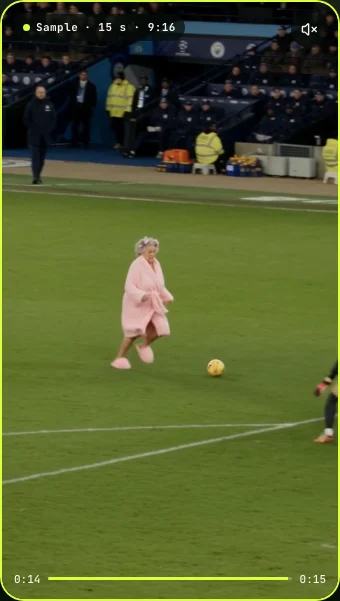
| The scorer's clothes changed | Describe the outfit from the photo in the scorer line. In our test the dressing gown and slippers came straight from the photo. |
| Moves are missing or in the wrong order | Shorten everything else and keep the play as one sentence in order. Too many extras crowd out the action. |
| A face that does not look like the photo | Use a sharper, front-facing photo in even light with one person in it. |
| The file has sound you do not want | Our Seedance 2.5 render came back with a sound track. Mute it in your editor and add the trend's sound when you post. |
How many tries to expect
Plan for more than one. Each render on these models costs credits or a share of a subscription, and the result changes from render to render even with the same prompt. Change one thing at a time, so you know what fixed it.
For reference, the version that worked for us was a photo and a prompt on Seedance 2.5, with no reference video: a 15-second, 480×854 clip with the keeper's save, both slide tackles and the empty net all there. It took about 6 minutes to render. That is one sample, so your results will vary.
Use people who agreed
Prompt or no prompt, use your own photo or an adult's who said yes, no celebrities and no children, and do not pass the clip off as real footage. Dreamina's page asks for an original player with no real-athlete likeness for the same reason.
When to skip the prompt
Writing and rerunning a prompt makes sense if you want a different angle, kit or stadium. If you only want the goal with you in it, Ozil AI keeps the prompt on its side: one photo, about 4 minutes, a silent 15-second 9:16 MP4, from $5.99 for 1 video, paid once. A failed video gives its credits back.